uMatrixNG
See everything a web page wants to load, and decide with one click what it may: scripts, cookies, frames, images and more, site by site.
It runs in Chrome, Edge, Brave and other Chromium browsers, version 145 or later.
No account, no telemetry, no ads.
What it is
A modern web page is rarely one site. It pulls scripts, frames, fonts, trackers and cookies from many others, and normally you see none of it.
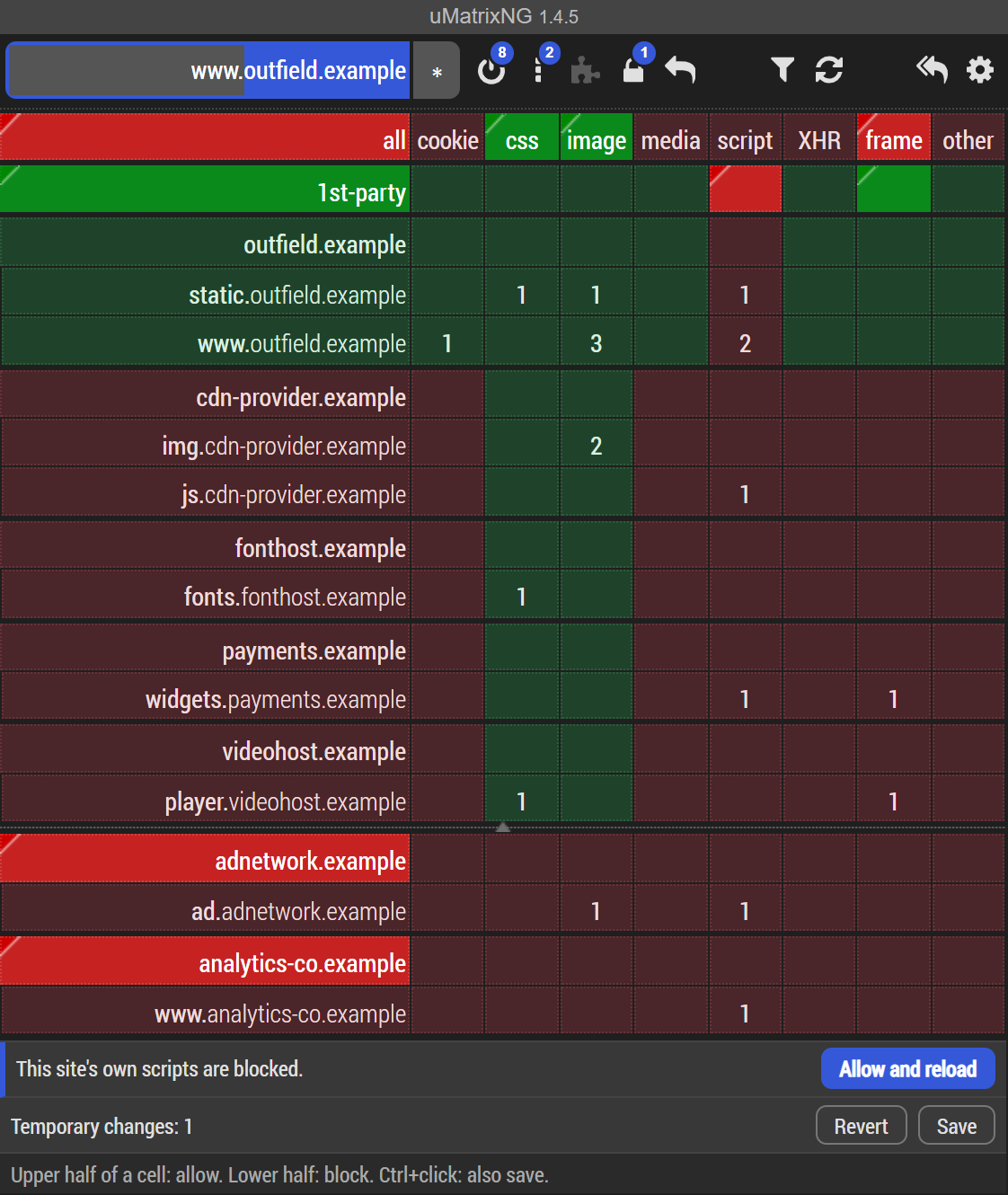
uMatrixNG puts all of it in one table, the matrix, and lets you allow or block each part. Nothing is hidden behind "recommended settings": what is green loads, what is red does not.
It is a tool for people who want to decide for themselves. Out of the box it already blocks most of what follows you around the web; when a site needs something more to work, you allow exactly that, for that site only.
If you know uMatrix: the matrix, the dashboard, the logger and your rules work as they did there, in browsers which require Manifest V3, with a good deal more.
How the matrix works
Click the uMatrixNG icon to open the matrix for the page you are on.
- Each row is a place the page talks to: the site itself (1st-party) and every other site it contacts.
- Each column is a kind of thing: cookies, CSS, images, media, scripts, XHR (background requests), frames, and everything else.
- Each cell shows how many such requests the page made, and its colour tells whether they are allowed.
- 3 Allowed by a rule of yours
- 3 Allowed, inherited from a broader rule
- 3 Blocked, inherited from a broader rule
- 3 Blocked by a rule of yours
- Click the upper half of a cell to allow, the lower half to block
Click a row's name to allow or block everything from that site, or a column's name for a whole kind of request.
Rules belong to a scope. A rule can apply on one site, on one domain, or everywhere. The scope is chosen at the top left of the matrix.
Changes are temporary until you save them. Try something, reload, and see whether the site works. Keep it with the padlock, or revert it with one click.
A look around
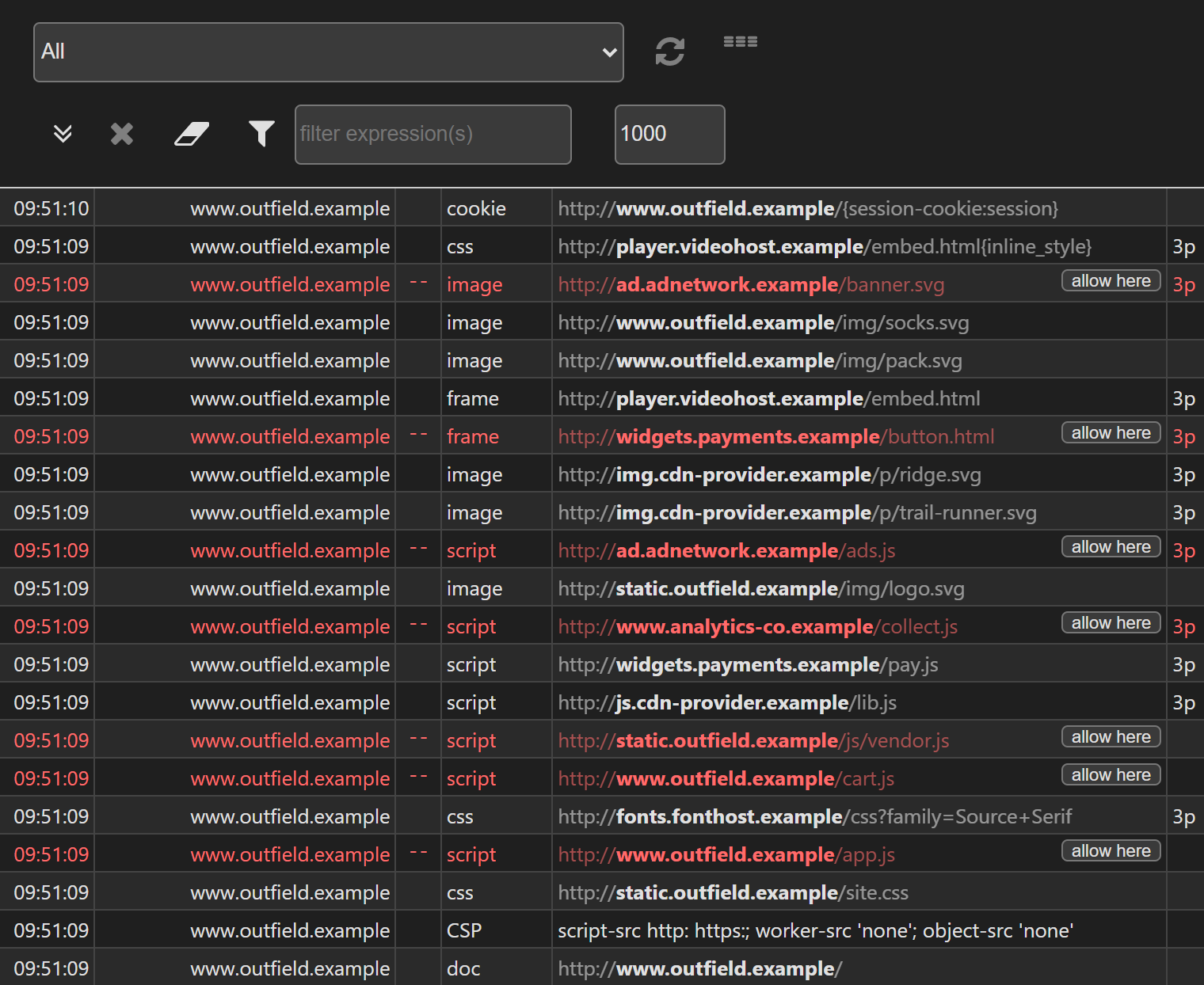
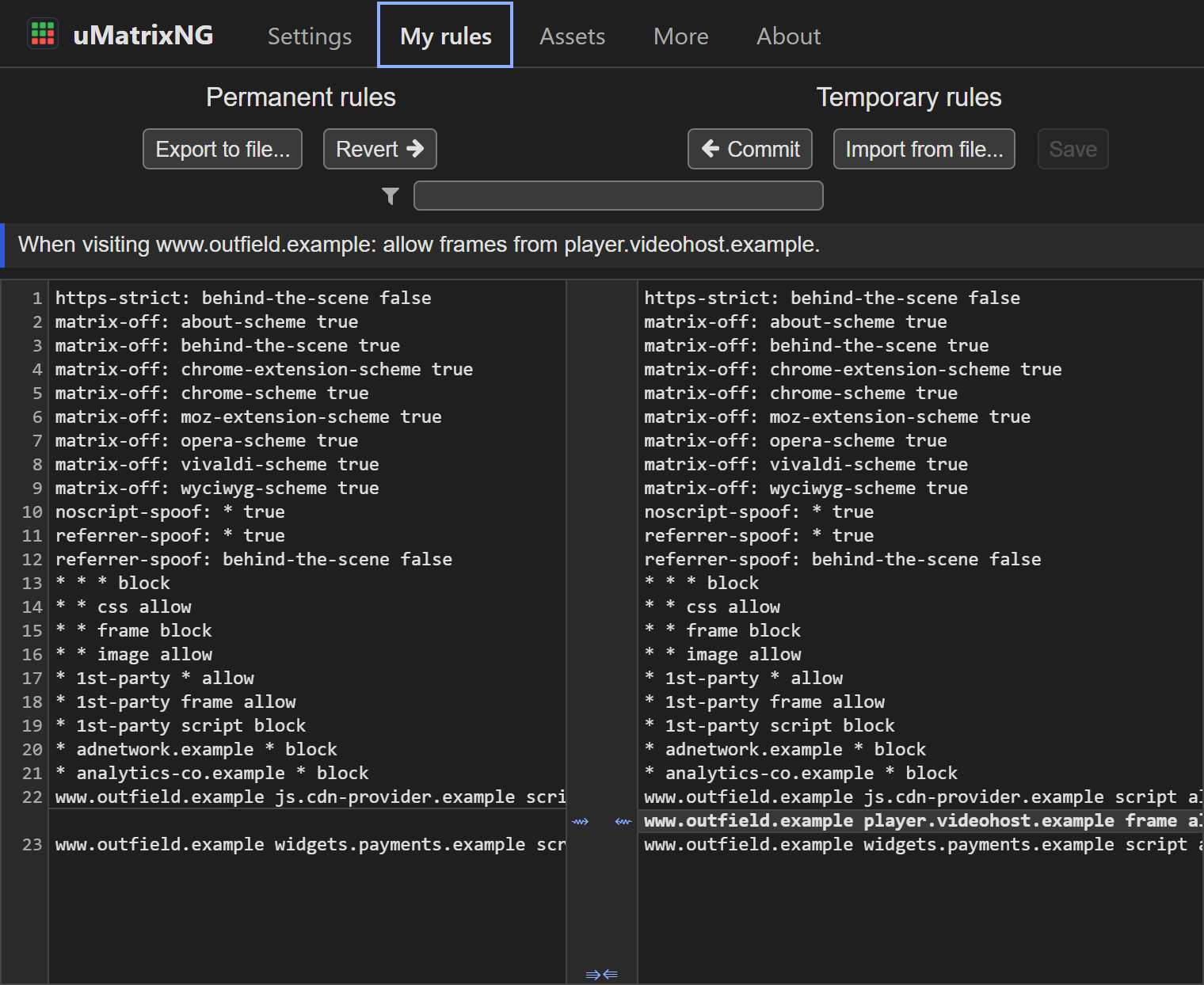
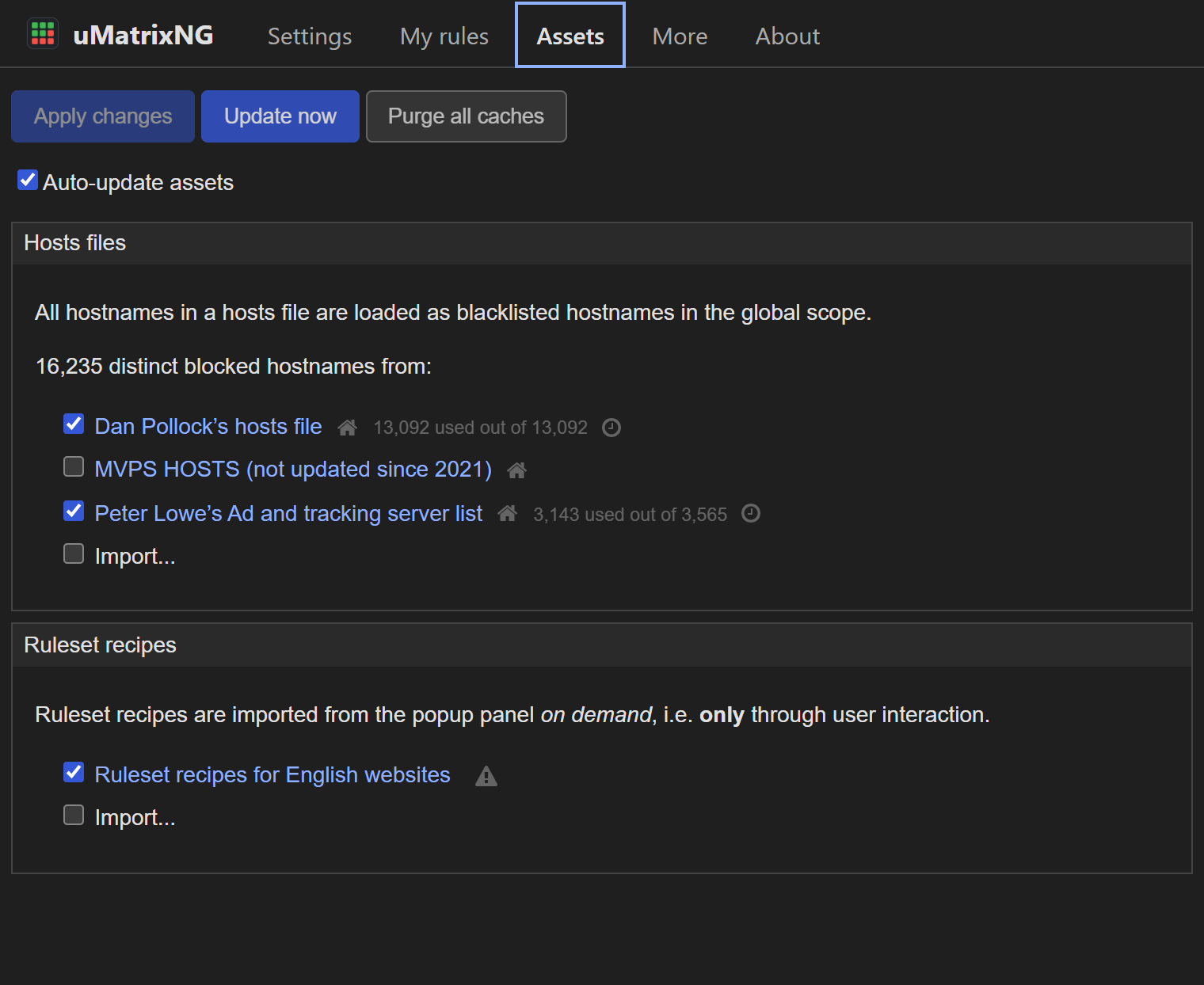
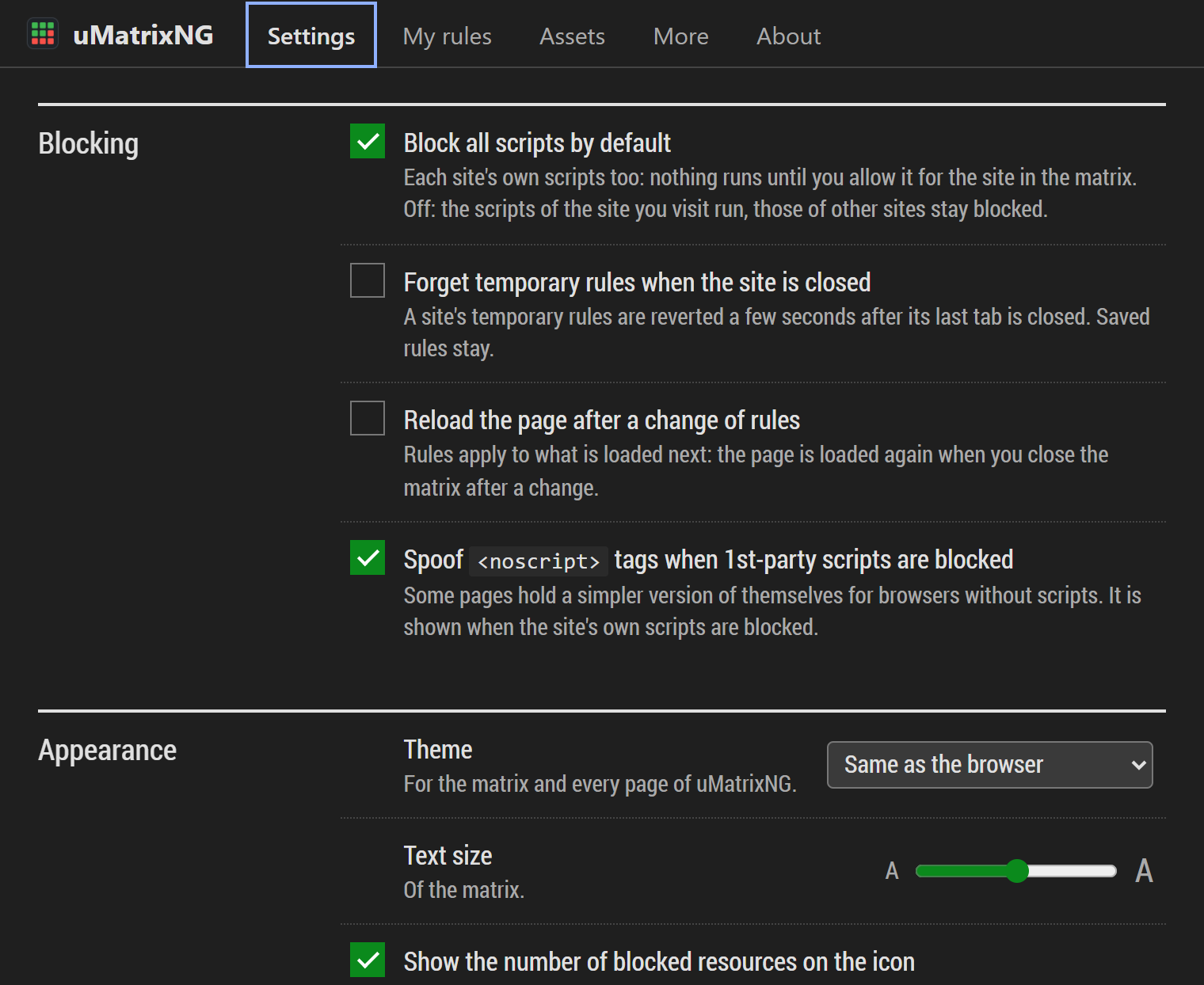
Besides the matrix, the dashboard and the logger show everything uMatrixNG does, in the theme of your choice.
What it does
-
Scripts require approval by default
A site's own scripts and scripts from other sites start blocked. Use the matrix to approve a script source for the site you're visiting.
-
Blocks known ad and tracking servers
Two well-known block lists are on from the start and updated automatically: Dan Pollock's hosts file and Peter Lowe's list. MVPS HOSTS is included too, switched off because it is no longer maintained. Everything from the servers they name is blocked, on every site.
-
Inline scripts and workers
When a document's own scripts are blocked, its policy also blocks event handlers, JavaScript links, workers and embedded objects. Service-worker caches have browser-imposed limits described in the README.
-
Cookies and referrers
Cookies of blocked sites are not sent, and can be deleted. The Referer header, which tells a site where you came from, is removed from requests to other sites.
-
Tracking parameters and Global Privacy Control
Click identifiers and campaign tags such as fbclid, gclid and utm_source are removed from the address of a page before the site is asked for it. Every request carries the Global Privacy Control signal, which asks sites not to sell or share your data. Both can be turned off.
-
Rules that hold from the first request
Chromium enforces your saved network rules across browser restarts. A packaged policy blocks scripts during installation and while a rule update is pending.
-
A logger to see what happens
The logger shows the requests the extension can observe and the corresponding rule decisions.
-
Your rules are yours
Rules are plain text you can read, edit, export and import. Back up and restore everything from the dashboard. Rules and backups of uMatrix can be imported.
-
Recipes for common sites
For some popular services, ready-made sets of rules ("recipes") are offered in the matrix when a page uses them, so that you don't have to work them out yourself.
Improved over uMatrix 1.4.4
uMatrix 1.4.4, the last version of the original, is a Manifest V2 extension, and Chromium browsers have phased those out. uMatrixNG is not just the same extension made to run again: the way rules are enforced is new, and so is a lot around it.
| uMatrix 1.4.4 | uMatrixNG | |
|---|---|---|
| Runs in current Chrome, Edge, Brave | No (Manifest V2) | Yes (Manifest V3, Chromium 145 or later) |
| Who enforces your rules | The extension, while it runs | The browser itself, from the first request after a restart |
| A site's own scripts | Allowed by default | Blocked until you approve them, like every other script |
| When rules can't be installed | Not applicable | Fails closed: scripts stay blocked until they are |
| Tracking parameters, Global Privacy Control | No | Removed, and sent (both can be turned off) |
| A web app which gives up for its error page | The error page's matrix shows nothing | Lists what the page before needed, one click to allow and reopen it |
| Your rules | Plain text | Plain text, also explained in words, with hints for rules that never apply |
| Restoring a backup | Emptied the storage, then wrote it | Checked first, written at once, undone if incomplete |
| Themes | Light, color-blind friendly | Follows the browser, plus Dracula, Nord, Solarized and Gruvbox |
Stricter, and it stays strict
- Every script needs your approval, the site's own included. uMatrix let a site's own scripts run unless you said otherwise; uMatrixNG starts from the other end.
- The browser enforces your rules. They are compiled into the browser's own network rules, so saved rules hold across restarts from the very first request, even before uMatrixNG has started.
- It fails closed. If the browser refuses a rule update, or your rules exceed its limits, a packaged rule set blocks every script until the rules are in place. When temporary rules exceed the browser's limit, your temporary blocks still apply at once, and temporary allows wait.
- Websites' service workers follow the rules of their site. uMatrix counted their requests as "behind the scene", where everything is allowed by default.
- Harder to trick. The blocked page only goes on to an address uMatrixNG itself blocked, and rules and settings can only be changed from uMatrixNG's own pages.
More privacy
- Tracking parameters such as
fbclid,gclidandutm_sourceare removed from addresses before the site is asked for them. - Global Privacy Control asks every site not to sell or share your data.
- Cookies of today's web: partitioned cookies and those of private windows are kept apart. The cookies of a site you're logged into are not deleted because another page loaded that site as a third party.
- Hyperlink auditing (
<a ping>) is turned off through the browser's own setting.
Easier to use
- The matrix says what a click will do, in words: "Allow scripts from cdn.example.com on example.org".
- When a web app gives up. Some apps show their own error page as soon as their scripts are blocked, and that page's matrix can't show what the app needed. uMatrixNG lists the scripts blocked on the page before it, each with an Allow button, and one click allows them and opens that page again. What your own rules block is not offered.
- "This site's own scripts are blocked": when that is the reason, the matrix says so, and one click allows them and reloads.
- Allow from the logger: a blocked line has an allow here button.
- Your rules, explained. In My rules, the rule under the pointer is said in words: "When visiting example.org: allow scripts from cdn.example.net". A rule that would never apply where it was likely meant is flagged, with the rule you probably wanted and an Add button. These hints stay folded behind one line until you open them, and a rule you meant as it is can be dismissed.
- Revert, Save and Reload buttons appear when there is something to revert, save or reload. Reload is only offered when reloading would change something.
- Ctrl+click a cell to change it and save that one change.
- Allow buttons on the blocked page, temporarily or for good. The page says so when an allow has to wait.
- A filter box in the matrix, for pages which contact dozens of sites.
- Temporary rules which expire, if you want: a site's temporary rules are reverted once its last tab is closed.
- Themes for the matrix, the dashboard and the logger, a welcome page which explains the matrix in a minute, and keyboard shortcuts.
| Alt Shift M | Open the matrix |
| Alt Shift A | Temporarily allow the current site's own requests, and reload |
| Alt Shift R | Revert the temporary rules of the current page, and reload |
| F5 | In the matrix: reload the page |
| Ctrl S | In the matrix: save the temporary changes |
| Ctrl Z | In the matrix: revert the temporary changes |
| / | In the matrix: filter the sites |
The first three can be changed on the browser's extension shortcuts page.
Safer with your rules and settings
- Backups carry the date and time in their file name.
- A backup is checked before it is restored: lines which are not rules are shown first, and a file with nothing usable is refused. The restore is written in one step, nothing else writes meanwhile, and it is undone if it can't be completed. uMatrix emptied the storage first, so a failed restore could leave no rules at all.
- Nothing is "saved" that wasn't. Settings say Saved only once the browser has written the change. A change the browser refuses is undone and shown as not saved, and no later save writes it behind your back.
- Cloud storage handles rules with international names, and uploads go one after the other.
- The About page tells whether your rules are in force, with rule counts and diagnostics. A red ! on the icon says when they are not.
What is different
Manifest V3 changes what an extension can do. A few things work differently from uMatrix as a result:
- The
Refererheader of requests to other sites is removed rather than replaced with a made-up one. - The "strict HTTPS" switch is gone. The browser's own mixed-content protection applies instead.
- Requests of type "other" are shown as the browser classifies them.
An icon that tells what happened
The toolbar icon is a small matrix of its own. Point at it for the numbers.
- All green: nothing on this page was blocked.
- Some red: about a third of the page's requests were blocked.
- Mostly red: most of what the page asked for was blocked.
- A slash: this site's own scripts are blocked. That is usually why a page looks broken.
- Hollow: uMatrixNG is turned off for this site.
- Gray: nothing to tell (a new tab, a page of the browser).
With the Dracula theme, which is the color-blind friendly one, the matrix and the icon use green and purple instead of green and red.
Bring your rules along
Coming from uMatrix?
In the old extension's dashboard, use About → Back up to file. In uMatrixNG, use Settings → Restore from file. Your rules and settings come along. For rules only: My rules → Export to file, then Import from file.
On more than one computer
Rules and settings stay in the browser of the computer they were made on. To bring them over, use Settings → Back up to file on one computer and Settings → Restore from file on the other. The file holds your saved rules and your settings, not the temporary rules.
Privacy
uMatrixNG uses the URLs, request types and cookie information available to the extension to enforce your rules and show activity in the matrix and logger. It processes that information in your browser. The extension has no telemetry or developer-operated data collection service.
Rules and settings are stored in the browser. If you enable cloud storage and upload your rules, the extension uses your browser's sync service. Backups and diagnostic exports are files you choose to save.
Automatic list updates contact the list providers, including someonewhocares.org, winhelp2002.mvps.org, pgl.yoyo.org and publicsuffix.org. Providers receive ordinary connection information, such as your IP address. Imported lists are fetched from the URLs you configure. To turn off automatic updates, clear Auto-update assets in the dashboard.
Good to know
- uMatrixNG is developed and tested in Microsoft Edge. It only uses standard extension features of Chromium, so it is expected to work the same in Chrome, Brave and others.
- Filtering requires extension access to the site. Local files, privileged browser pages, and incognito windows without extension access fall outside that coverage. Reload pages after revoking script approval.
- It is an advanced tool. Blocking things can break sites until you allow what they need, which is the point of it.
Credits
uMatrixNG was born out of love for the original project. Through the years, uMatrix has been a must-have on every computer I have used, and uMatrixNG exists so that it can live on in today's browsers. My sincere thanks to Raymond Hill, and to everyone who contributed to uMatrix, for creating it and sharing it with all of us.
uMatrixNG is based on uMatrix 1.4.4 by Raymond Hill (gorhill) and its contributors, and has been changed by Stefan Dasic since September 2026.
uMatrixNG is an independent project. The author of uMatrix is not involved in it and does not support it. Out of respect for the original project, please do not bring problems with uMatrixNG to it: write to me instead.
Both uMatrix and uMatrixNG are free software, released under the GNU General Public License, version 3. The source code archive, linked at the top of this page, contains the complete source code and the licence.
Third-party components bundled with uMatrixNG, each under its own licence:
- Punycode.js 1.3.2 by Mathias Bynens (MIT): international domain names.
- publicsuffixlist.js by Raymond Hill (GPLv3): registrable domains.
- CodeMirror 5.40.2 by Marijn Haverbeke (MIT): the rules editor.
- diff by Arpad Borsos, portions (LGPLv3): the view of changes to rules.
- Font Awesome 4.7.0 icons by Dave Gandy (SIL OFL 1.1, MIT).
- Roboto Condensed font (Apache 2.0).
- Fallback copies of the public suffix list (MPL 2.0), Dan Pollock's hosts file, Peter Lowe's list and MVPS HOSTS (CC BY-NC-SA 4.0), updated online when automatic updates are on.
Contact
Found a problem, have a question or a suggestion? Write to mail@dasicx.com.
For a problem, it helps to say which browser and version you use, which site it happens on, and what you expected. The dashboard's About tab can export diagnostics. That file contains your rules and settings, and names the sites involved in the problems it recorded, so look through it before you send it.